Let's Build a Print-Ready Die-Cut Sticker SaaS from scratch in Golang & Next.js [Part 4]

Karan Kashyap
July 3, 2026
![Let's Build a Print-Ready Die-Cut Sticker SaaS from scratch in Golang & Next.js [Part 4]](/_next/image/?url=https%3A%2F%2Fcdn.sanity.io%2Fimages%2F3e1sexdu%2Fproduction%2Feeb1314f51d4c39e5d1e176c2c837de8f33725ca-1600x739.png%3Frect%3D246%2C0%2C1109%2C739%26w%3D1200%26h%3D800%26q%3D85%26fit%3Dcrop%26auto%3Dformat&w=3840&q=75)
Part 4: The Core Imaging Pipeline
Everything up to this point — auth, storage, the GraphQL surface — exists to get a file safely into R2 and a row safely into Postgres. This part is about what happens to the pixels: turning an arbitrary photo into a clean cutout, a die-cut path a printer can actually cut along, and a report on whether the result will print well at all.
This package has one rule that shaped every decision in it: no I/O, no queue, no network calls. core-imaging takes an image.Image in and returns a Result out. That constraint is what makes it possible to unit-test the whole pipeline with synthetic images in milliseconds, instead of needing real photos and a running worker.
The entry point
1// packages/core-imaging/imaging.go2type Options struct {3 OffsetMm float64 // border width in mm, default 3.04 Smoothing float64 // contour smoothing [0–1], default 0.55 CutMode CutMode // DIE_CUT or KISS_CUT6 PhysicalWMm float64 // sticker width in mm, for DPI/bleed7 PhysicalHMm float648}910type Result struct {11 Cutout *image.NRGBA // background removed, clean alpha12 ContourSVG string // die-cut path as SVG13 Readiness ReadinessReport // per-check pass/warn/fail14 Meta Meta // confidence, dimensions, DPI15}1617func Process(img image.Image, opts Options) (*Result, error)
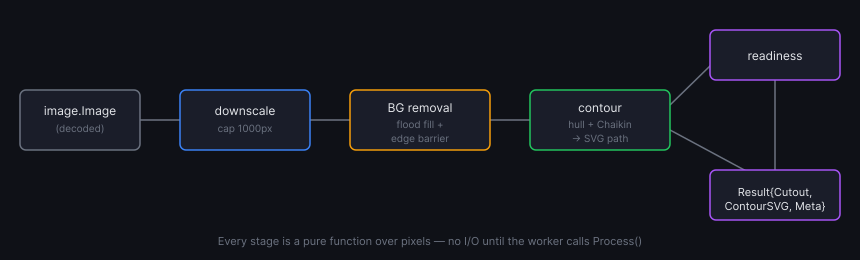
Four stages run in sequence: downscale → background removal → contour tracing → readiness checks. Every stage is also an exported function on its own, so a test can call removeBackground directly without paying for the rest of the pipeline.
Downscale first, upsample the result
A 4000×4000 photo run through per-pixel flood fill and morphological ops is slow — most of that is wasted resolution nobody can see in a sticker outline anyway. Anything over 1000px on the long side gets downscaled before processing, and only the final cutout is upsampled back to original size:
1// packages/core-imaging/imaging.go2const maxProcessPx = 100034processImg := rgba5scale := 1.06if origW > maxProcessPx || origH > maxProcessPx {7 scale = float64(maxProcessPx) / float64(max(origW, origH))8 processImg = downscale(rgba, int(float64(origW)*scale), int(float64(origH)*scale))9}
This is the difference between a 2000×2000 image taking ~60 seconds and taking under 10 — the contour only needs to be accurate to sub-millimeter precision, not to the original pixel grid.
Background removal without a vision model
No OpenCV, no ONNX runtime, no bundled model weights — background removal is a flood fill that starts at the image border and grows inward through anything close enough in color to what it finds there, entirely in pure Go:
1// packages/core-imaging/bgremoval.go2func removeBackground(src *image.NRGBA) (*image.NRGBA, float64, error) {3 bgColor := sampleBorderColor(src)4 mask := buildAlphaMask(src, bgColor)5 mask = morphologicalCleanup(mask, w, h)6 // ...apply mask as alpha channel, compute confidence7}
The tricky part isn't the flood fill itself, it's stopping it from leaking into the subject. A sticker with text on it — something like a circular "MADE WITH LOVE" wrapped around a logo — has thin gaps between letters that a naive flood fill will happily pour through, eating a hole in the middle of the design. The fix is an edge barrier: pixels with a strong local gradient get marked as walls the flood can't cross, and those walls get dilated by a pixel so narrow gaps close up:
1// packages/core-imaging/bgremoval.go2func buildEdgeBarrier(img *image.NRGBA, w, h int, bounds image.Rectangle, threshold float64, dilateR int) []bool {3 // Sobel-style gradient magnitude per pixel, thresholded, then dilated4 // by dilateR so 1px letter gaps can't act as flood channels.5}
The color tolerance for "is this background" isn't a fixed number either — it's derived per image from the variance of the border pixels themselves (mean + 2·stddev, clamped to a sane range), so a flat studio-white background gets a tight tolerance and a noisier photo gets a looser one.
A confidence score, not just a yes/no
Background removal on a low-contrast photo — subject and background nearly the same color — is going to be wrong in a way a human should check before printing. Rather than silently producing a bad cutout, the pipeline scores its own result:
1// packages/core-imaging/bgremoval.go2func computeConfidence(mask []uint8, w, h int, bgColor color.NRGBA, src *image.NRGBA) float64 {3 fgRatio := float64(fgCount) / float64(total)4 confidence := 1.05 if fgRatio > 0.9 || fgRatio < 0.05 {6 confidence = 0.4 // removed almost nothing, or almost everything7 } else if fgRatio > 0.8 || fgRatio < 0.1 {8 confidence = 0.69 }10 confidence -= noiseScore(mask, w, h) * 0.3 // speckled masks lose points too11 return confidence12}
Confidence below 0.7 sets Meta.TouchUpSuggested = true, which the API exposes on the Design.confidence field and the Studio UI turns into a dismissible "manual touch-up suggested" banner. The mask itself gets one more pass — erosion then dilation to kill speckle, then a 2px feather so the cutout edge doesn't look like it was cut with scissors.
From alpha mask to a cuttable path
The contour has to satisfy something a raw pixel mask never guarantees: a single closed loop, no self-intersections, nothing a die-cutting blade can't physically follow. The approach is convex hull, not full contour tracing — for sticker-shaped subjects (one blob, no holes) it's simpler and structurally guarantees a valid closed path:
1// packages/core-imaging/contour.go2dilated := dilateBoolean(mask, w, h, offsetPx) // push the boundary out by the border width3hullPts := foregroundHullPoints(dilated, w, h) // subsample foreground pixels4hull := convexHull(hullPts) // Graham scan5smoothed := chaikinSmooth(hull, iterations) // round off the hull's straight edges
Graham scan needs a pivot point guaranteed to be on the hull — normally the bottom-most point, but image coordinates have Y growing downward, so the pivot here is the top-most point instead; using the bottom would silently produce a degenerate partial arc instead of a full hull. Chaikin subdivision then rounds off what would otherwise be a faceted polygon, and the smoothed points get converted to cubic Bézier segments and written into a spot-color SVG layer named CutContour — the naming convention print shops expect:
1// packages/core-imaging/contour.go2return fmt.Sprintf(`<svg ...>3 <g id="%s" inkscape:label="%s" inkscape:groupmode="layer">4 <path d="%s" fill="none" stroke="%s" stroke-width="0.72"/>5 </g>6</svg>`, cutLabel, cutLabel, pathData, strokeColor)
Four print-readiness checks
Before a design ships to a printer, four independent checks run against the cutout and get bundled into a ReadinessReport — DPI, bleed, safe area, and color gamut, each returning PASS, WARN, or FAIL with a human-readable message. DPI is the simplest and the one most likely to actually block a print:
1// packages/core-imaging/readiness.go2func checkDPI(bounds image.Rectangle, opts Options) (CheckResult, float64) {3 dpi := min(width_px / (physicalWMm / 25.4), height_px / (physicalHMm / 25.4))4 switch {5 case dpi >= 300:6 return CheckResult{Status: CheckPass, ...}, dpi7 case dpi >= 150:8 return CheckResult{Status: CheckWarn, Message: "...print may appear slightly soft."}, dpi9 default:10 return CheckResult{Status: CheckFail, Message: "...print will be blurry."}, dpi11 }12}
Bleed measures the distance from the image edge to the nearest opaque pixel and flags anything under 3mm; safe-area looks for high-gradient (i.e. "busy") content sitting inside the trim margin, where a cutting tolerance could clip it; color gamut is a saturation heuristic — bright, highly saturated pixels are the ones CMYK printing tends to mute or shift, so a high percentage of them earns a warning rather than a silent surprise on the printed sticker.
The pipeline, visually
Testing without a fixture library
There's no folder of curated product photos backing these tests — instead, regression_test.go procedurally generates around thirty synthetic cases (solid shapes, gradients, different sizes, both cut modes, a range of background colors) and asserts every one of them makes it through Process without error. It trades photographic realism for something more useful in CI: complete determinism and zero binary assets in the repo.
1// packages/core-imaging/regression_test.go2cases = append(cases, regressionCase{3 name: "clear_circle",4 img: makeCircleImage(200, 200),5 opts: coreimaging.Options{OffsetMm: 3, Smoothing: 0.5, PhysicalWMm: 50, PhysicalHMm: 50},6 wantPass: true,7})
The performance target from the pipeline's design goal — sub-10-second processing at 2000×2000 — is enforced directly as a test, not just measured by hand:
1// packages/core-imaging/benchmark_test.go2func TestProcess_2000x2000_Under10s(t *testing.T) {3 if testing.Short() {4 t.Skip("skipping performance test in short mode")5 }6 start := time.Now()7 result, err := coreimaging.Process(make2000x2000Image(), opts)8 elapsed := time.Since(start)9 if elapsed > 10*time.Second {10 t.Errorf("processing took %v, want <10s", elapsed)11 }12}
testing.Short() keeps this out of the fast local loop while CI still runs it on every push.
Verify it
1go test ./packages/core-imaging/...2go test -run TestProcess_2000x2000_Under10s ./packages/core-imaging/...
Both should pass green, and the second prints the actual elapsed time for the 2000×2000 case — worth watching if you touch anything in the mask or hull code, since it's the one number that quietly tells you if an "optimization" made things worse.
None of this runs against a real design yet, though — it's a library sitting idle until something calls it.
Next up — Part 5: wiring core-imaging into a durable job queue, so the worker actually runs it against uploaded files and pushes live status back to the client.






![Let's Build a Print-Ready Die-Cut Sticker SaaS from scratch in Golang & Next.js [Part 6]](/_next/image/?url=https%3A%2F%2Fcdn.sanity.io%2Fimages%2F3e1sexdu%2Fproduction%2Feeb1314f51d4c39e5d1e176c2c837de8f33725ca-1600x739.png%3Frect%3D61%2C0%2C1478%2C739%26w%3D800%26h%3D400%26q%3D85%26fit%3Dcrop%26auto%3Dformat&w=3840&q=75)