Let's Build a Customer Support AI Copilot: An Event-Driven Agent with LangGraph, Go, pgvector & Redis Streams [Part 5]

Karan Kashyap
June 29, 2026
![Let's Build a Customer Support AI Copilot: An Event-Driven Agent with LangGraph, Go, pgvector & Redis Streams [Part 5]](https://cdn.sanity.io/images/3e1sexdu/production/781f46e14b12f1c6fa14be602953f7bd46c7da47-780x200.svg?rect=240,0,300,200&w=1200&h=800&q=85&fit=crop&auto=format)
Part 5 — The Next.js Console: Queue, Review, and Real-Time Updates
The console has one job: make the human-in-the-loop workflow as frictionless as possible. A customer message arrives, the agent processes it, and a draft appears in the queue — live, without a refresh. The reviewer reads it, checks the grounding sources, sees the guard results, and either approves, edits, rejects, or escalates. All of that is a GraphQL subscription wired to a real-time queue view.
1apps/web/2├── app/3│ ├── layout.tsx # root layout: fonts + Providers wrapper4│ ├── page.tsx # "/" — NewMessage + QueueView5│ ├── providers.tsx # urql Client + Toaster (client boundary)6│ └── c/[id]/7│ └── page.tsx # "/c/:id" — ConversationView8├── components/9│ ├── compose/new-message.tsx # submit a customer message via mutation10│ ├── queue/11│ │ ├── queue-view.tsx # subscription + paginated list12│ │ └── draft-row.tsx # summary card; links to detail13│ ├── draft/14│ │ ├── draft-panel.tsx # full draft detail (presentational)15│ │ ├── draft-actions.tsx # approve / reject / escalate mutations16│ │ ├── confidence-meter.tsx # gauge with threshold tick17│ │ ├── guard-badges.tsx # grounded / tone / policy chips18│ │ └── status-badge.tsx # SUGGESTED / ESCALATED / SENT / REJECTED19│ ├── dashboard/20│ │ └── dashboard-view.tsx # throughput stats + eval history21│ └── conversation/22│ ├── conversation-view.tsx # two-column: thread + draft panel23│ └── message-thread.tsx # message list24└── lib/25 ├── urql.ts # Client factory (HTTP + WS exchanges)26 ├── config.ts # NEXT_PUBLIC_* env with localhost defaults27 ├── status.ts # enum → semantic color token mappings28 └── graphql/operations.ts # all GQL documents (codegen-typed)
Step 1: The GraphQL Client
The entire UI shares one urql Client. It connects to the Go API over HTTP for queries and mutations, and over WebSocket for subscriptions. The client is created once per browser session via useMemo inside a client-side Providers component.
1// apps/web/lib/urql.ts2"use client";34import { Client, cacheExchange, fetchExchange, subscriptionExchange } from "urql";5import { createClient as createWSClient } from "graphql-ws";6import { GRAPHQL_HTTP, GRAPHQL_WS } from "./config";78const wsClient =9 typeof window !== "undefined"10 ? createWSClient({ url: GRAPHQL_WS })11 : null;1213export function makeClient(): Client {14 return new Client({15 url: GRAPHQL_HTTP,16 exchanges: [17 cacheExchange,18 fetchExchange,19 subscriptionExchange({20 forwardSubscription(request) {21 const input = { ...request, query: request.query ?? "" };22 return {23 subscribe(sink) {24 if (!wsClient) return { unsubscribe() {} };25 const unsubscribe = wsClient.subscribe(input, sink);26 return { unsubscribe };27 },28 };29 },30 }),31 ],32 });33}
The typeof window !== "undefined" guard prevents graphql-ws from being constructed during Next.js server rendering — subscriptions are client-only. Both URLs default to localhost:8080 so the app works after docker compose up with no configuration:
1// apps/web/lib/config.ts2export const GRAPHQL_HTTP =3 process.env.NEXT_PUBLIC_GRAPHQL_HTTP ?? "http://localhost:8080/query";45export const GRAPHQL_WS =6 process.env.NEXT_PUBLIC_GRAPHQL_WS ?? "ws://localhost:8080/query";
Step 2: Typed Operations via Codegen
Every GraphQL document lives in one file. graphql-codegen runs as a prebuild/predev hook and generates TypeScript types from the shared schema. Calling graphql(...) wraps each document in a TypedDocumentNode — urql's hook return types are fully inferred with no as casts.
1// apps/web/lib/graphql/operations.ts23// Shared fragment — the single source of truth for what a Draft looks like.4// Queue rows, the detail panel, and subscription payloads all use this type.5export const DraftFields = graphql(`6 fragment DraftFields on Draft {7 id8 messageId9 conversationId10 intent11 category12 sentiment13 urgency14 answer15 suggestedAction16 confidence17 status18 createdAt19 citations { kbId title snippet }20 guard { grounded tone policy reasons }21 }22`);2324export const QueueQuery = graphql(`25 query Queue($status: DraftStatus, $limit: Int, $cursor: String) {26 queue(status: $status, limit: $limit, cursor: $cursor) {27 items { ...DraftFields }28 nextCursor29 }30 }31`);3233export const DraftUpdatesSubscription = graphql(`34 subscription DraftUpdates($conversationId: ID) {35 draftUpdates(conversationId: $conversationId) {36 ...DraftFields37 }38 }39`);4041export const IngestMessageMutation = graphql(`42 mutation IngestMessage($input: IngestInput!) {43 ingestMessage(input: $input) { id role body createdAt }44 }45`);4647export const ApproveReplyMutation = graphql(`48 mutation ApproveReply($draftId: ID!, $edited: String) {49 approveReply(draftId: $draftId, edited: $edited) { ...DraftFields }50 }51`);5253export const RejectReplyMutation = graphql(`54 mutation RejectReply($draftId: ID!, $reason: String) {55 rejectReply(draftId: $draftId, reason: $reason) { ...DraftFields }56 }57`);5859export const EscalateMutation = graphql(`60 mutation Escalate($draftId: ID!) {61 escalate(draftId: $draftId) { ...DraftFields }62 }63`);
DraftFieldsFragment — the TypeScript type inferred from the fragment — is imported by every component that touches a draft. There's one shape, shared everywhere, generated from the schema.
Step 3: Root Layout and Providers
Fonts are loaded via next/font/google and injected as CSS variables. The Providers component is a client boundary that owns the urql client and the toast system.
1// apps/web/app/layout.tsx2import { Hanken_Grotesk, JetBrains_Mono, Bricolage_Grotesque } from "next/font/google";3import { Providers } from "./providers";4import { SiteHeader } from "@/components/site-header";56const hanken = Hanken_Grotesk({ subsets: ["latin"], variable: "--font-hanken", display: "swap" });7const jetbrains = JetBrains_Mono({ subsets: ["latin"], variable: "--font-jetbrains", display: "swap" });8const bricolage = Bricolage_Grotesque({ subsets: ["latin"], variable: "--font-bricolage", display: "swap" });910export default function RootLayout({ children }: { children: React.ReactNode }) {11 return (12 <html lang="en" className="dark">13 <body className={`${hanken.variable} ${jetbrains.variable} ${bricolage.variable} min-h-dvh`}>14 <Providers>15 <div className="flex min-h-dvh flex-col">16 <SiteHeader />17 <main className="mx-auto w-full max-w-6xl flex-1 px-4 py-6 sm:px-6">18 {children}19 </main>20 </div>21 </Providers>22 </body>23 </html>24 );25}
1// apps/web/app/providers.tsx2"use client";34import { useMemo } from "react";5import { Provider } from "urql";6import { makeClient } from "@/lib/urql";7import { Toaster } from "@/components/ui/sonner";89export function Providers({ children }: { children: React.ReactNode }) {10 const client = useMemo(() => makeClient(), []);11 return (12 <Provider value={client}>13 {children}14 <Toaster theme="dark" position="bottom-right" />15 </Provider>16 );17}
Step 4: The Home Page — Compose + Queue
The root route renders two components top-to-bottom: a compose box that submits a customer message, and the queue that shows all drafts.
1// apps/web/app/page.tsx2import { NewMessage } from "@/components/compose/new-message";3import { QueueView } from "@/components/queue/queue-view";45export default function HomePage() {6 return (7 <>8 <NewMessage />9 <QueueView />10 </>11 );12}
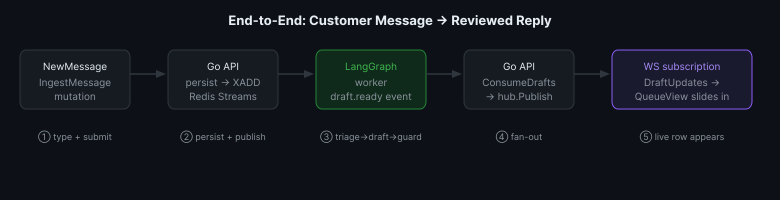
NewMessage fires IngestMessage and shows a toast — the draft appears in the queue below on its own via the subscription, demonstrating the end-to-end flow:
1// apps/web/components/compose/new-message.tsx2"use client";34export function NewMessage() {5 const [body, setBody] = useState("");6 const [{ fetching }, ingest] = useMutation(IngestMessageMutation);78 async function submit() {9 const text = body.trim();10 if (!text) return;11 const res = await ingest({ input: { body: text } });12 if (res.error) { toast.error(res.error.message); return; }13 toast.success("Message ingested — draft incoming");14 setBody("");15 }1617 return (18 <div className="mb-6 rounded-lg border border-border bg-card/40 p-3">19 <label htmlFor="new-message" className="font-mono text-[10px] uppercase tracking-[0.15em] text-muted-foreground">20 Simulate a customer message21 </label>22 <Textarea23 id="new-message"24 value={body}25 onChange={(e) => setBody(e.target.value)}26 onKeyDown={(e) => { if (e.key === "Enter" && (e.metaKey || e.ctrlKey)) submit(); }}27 placeholder="e.g. How do I cancel an order I just placed?"28 rows={2}29 className="mt-2 resize-none text-sm font-display"30 />31 <div className="mt-2 flex items-center justify-between">32 <span className="font-mono text-[10px] text-muted-foreground">⌘/Ctrl + Enter</span>33 <Button size="sm" disabled={fetching || !body.trim()} onClick={submit}>34 <Send className="size-4" /> {fetching ? "Sending…" : "Send"}35 </Button>36 </div>37 </div>38 );39}
Step 5: The Live Queue
QueueView is the most complex component. It does three things simultaneously: paginate drafts from the REST-style queue query, subscribe for live updates, and maintain local state that merges both sources.
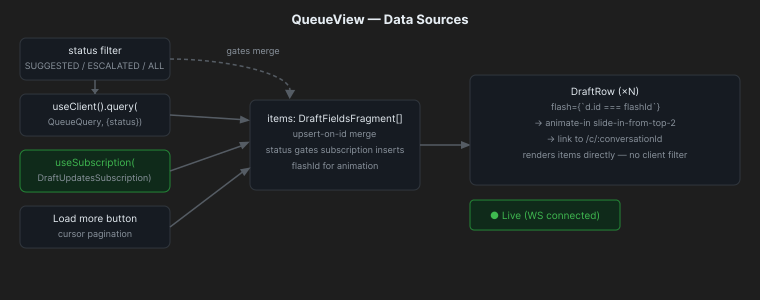
1// apps/web/components/queue/queue-view.tsx2"use client";34const PAGE = 25;56export function QueueView() {7 const client = useClient();8 const [status, setStatus] = useState<DraftStatus | null>(null);9 const [items, setItems] = useState<DraftFieldsFragment[]>([]);10 const [cursor, setCursor] = useState<string | null>(null);11 const [flashId, setFlashId] = useState<string | null>(null);1213 // One subscription for the whole queue; conversationId=null = all conversations.14 const [stream] = useSubscription({ query: DraftUpdatesSubscription, variables: { conversationId: null } });15 const live = !stream.error;1617 useEffect(() => {18 const d = stream.data?.draftUpdates;19 if (!d) return;20 setItems((prev) => {21 // Update in-place if already present, prepend if new.22 if (prev.some((x) => x.id === d.id)) return prev.map((x) => (x.id === d.id ? d : x));23 if (status && d.status !== status) return prev; // outside the active filter24 return [d, ...prev];25 });26 setFlashId(d.id); // triggers the CSS animation on the new row27 }, [stream.data, status]);2829 const fetchPage = useCallback(30 async (next: string | null, append: boolean) => {31 setLoading(true);32 const res = await client.query(QueueQuery, { status, limit: PAGE, cursor: next }).toPromise();33 if (res.data) {34 const page = res.data.queue.items;35 setItems((prev) => (append ? [...prev, ...page] : page));36 setCursor(res.data.queue.nextCursor ?? null);37 }38 setLoading(false);39 },40 [client, status],41 );4243 useEffect(() => { fetchPage(null, false); }, [fetchPage]);44 // ...45}
The live indicator — ● Live vs Offline — derives directly from stream.error. If the WebSocket drops, the dot goes grey; no manual ping needed.
When a subscription event arrives, the merge logic:
- If a row with that id already exists → replace it (status transition: PENDING → SUGGESTED).
- If it's new and matches the current filter → prepend + set
flashId. - If it's new but outside the active filter → ignore (don't blow up the filtered view).
Step 6: The Draft Row
Each row in the list shows everything a reviewer needs to decide whether to open the detail view:
1// apps/web/components/queue/draft-row.tsx2export function DraftRow({ draft, flash }: { draft: DraftFieldsFragment; flash?: boolean }) {3 return (4 <Link5 href={`/c/${draft.conversationId}`}6 className={cn(7 "group block rounded-lg border border-border bg-card/60 p-4 transition-colors hover:border-signal/40",8 flash && "animate-in fade-in slide-in-from-top-2 duration-500 border-signal/50",9 )}10 >11 <div className="flex items-start justify-between gap-3">12 <div className="flex flex-wrap items-center gap-2">13 <span className="font-mono text-sm font-medium">{draft.intent}</span>14 <Badge variant="outline" className={toneClass(sentimentTone(draft.sentiment))}>15 {draft.sentiment}16 </Badge>17 <Badge variant="outline" className={toneClass(urgencyTone(draft.urgency))}>18 {draft.urgency}19 </Badge>20 </div>21 <div className="flex items-center gap-2">22 <StatusBadge status={draft.status} />23 <span className="font-mono text-[11px] text-muted-foreground">{formatRelative(draft.createdAt)}</span>24 </div>25 </div>2627 <p className="mt-2 line-clamp-2 text-sm text-muted-foreground">{draft.answer}</p>2829 <div className="mt-3 flex items-center gap-4">30 <ConfidenceMeter value={draft.confidence} className="max-w-[180px] flex-1" />31 <GuardBadges guard={draft.guard} />32 <span className="ml-auto font-mono text-[11px] text-muted-foreground">33 {draft.citations.length} cited34 </span>35 </div>36 </Link>37 );38}
flash && "animate-in slide-in-from-top-2" — new rows slide in from the top for 500ms. After that, the flashId is cleared and the row looks identical to any other.
Step 7: The Semantic Color System
All status-to-color mappings live in one file, imported by every component. No hardcoded hex, no scattered conditional classes. The actual color values are CSS variables in globals.css; the TypeScript layer maps enums to semantic token names.
1// apps/web/lib/status.ts23// Mirrors the worker's escalation cutoff so the gauge threshold is accurate.4export const CONFIDENCE_THRESHOLD = 0.6;56type Tone = "ok" | "warn" | "danger" | "info" | "muted";78const STATUS_TONE: Record<DraftStatus, Tone> = {9 PENDING: "info",10 SUGGESTED: "ok",11 ESCALATED: "warn",12 SENT: "ok",13 REJECTED: "danger",14};1516export function statusTone(s: DraftStatus): Tone { return STATUS_TONE[s] ?? "muted"; }1718export function confidenceTone(c: number): Tone {19 if (c < 0.4) return "danger";20 if (c < CONFIDENCE_THRESHOLD) return "warn";21 return "ok";22}2324export function formatRelative(iso: string): string {25 const diff = Date.now() - new Date(iso).getTime();26 const s = Math.round(diff / 1000);27 if (s < 60) return "just now";28 const m = Math.round(s / 60);29 if (m < 60) return `${m}m ago`;30 const h = Math.round(m / 60);31 if (h < 24) return `${h}h ago`;32 return `${Math.round(h / 24)}d ago`;33}
CONFIDENCE_THRESHOLD = 0.6 deliberately mirrors the worker's CONFIDENCE_THRESHOLD environment variable default. If that value changes in the worker, the UI threshold should change too — keeping them in sync in a shared constant would require a monorepo cross-package import, but for a single-repo project the explicit comment is enough to catch it in review.
Step 8: The Confidence Meter
A horizontal gauge with a tick mark at the escalation threshold. At a glance, a reviewer sees whether a draft cleared the bar the worker uses to decide "suggest vs escalate."
1// apps/web/components/draft/confidence-meter.tsx2export function ConfidenceMeter({ value, className }: { value: number; className?: string }) {3 const pct = Math.round(Math.min(1, Math.max(0, value)) * 100);4 const tone = confidenceTone(value);5 return (6 <div className={cn("flex items-center gap-2", className)}>7 <div className="relative h-1.5 flex-1 overflow-hidden rounded-full bg-muted">8 <div className={cn("h-full rounded-full transition-all", FILL[tone])} style={{ width: `${pct}%` }} />9 {/* Tick at the escalation threshold — not a visual decoration, tells the reviewer10 whether this draft would have been suggested or escalated on confidence alone. */}11 <div12 className="absolute top-0 h-full w-px bg-foreground/40"13 style={{ left: `${CONFIDENCE_THRESHOLD * 100}%` }}14 aria-hidden15 />16 </div>17 <span className="w-9 shrink-0 text-right font-mono text-xs tabular-nums text-muted-foreground">18 {pct}%19 </span>20 </div>21 );22}
Step 9: The Guard Badges
Three deterministic checks from the worker — grounded, tone, policy — each rendered as a small chip. Green check = pass, red X = fail.
1// apps/web/components/draft/guard-badges.tsx2function GuardChip({ label, ok }: { label: string; ok: boolean }) {3 return (4 <span className={cn(5 "inline-flex items-center gap-1 rounded-sm border px-1.5 py-0.5 font-mono text-[10px] uppercase tracking-wider",6 ok ? "border-ok/30 bg-ok/10 text-ok" : "border-danger/30 bg-danger/10 text-danger",7 )}>8 {ok ? <Check className="size-3" /> : <X className="size-3" />}9 {label}10 </span>11 );12}1314export function GuardBadges({ guard }: { guard: DraftFieldsFragment["guard"] }) {15 return (16 <div className="flex flex-wrap items-center gap-1.5">17 <GuardChip label="grounded" ok={guard.grounded} />18 <GuardChip label="tone" ok={guard.tone} />19 <GuardChip label="policy" ok={guard.policy} />20 </div>21 );22}
Step 10: Conversation Detail — Thread + Draft
Clicking a row navigates to /c/:id. This page shows two columns: the message thread on the left and the active draft on the right.
1// apps/web/components/conversation/conversation-view.tsx2"use client";34export function ConversationView({ id }: { id: string }) {5 const [{ data, fetching, error }, reexecute] = useQuery({6 query: ConversationQuery,7 variables: { id },8 requestPolicy: "cache-and-network",9 });1011 // Narrow subscription: only events for this conversation.12 const [stream] = useSubscription({13 query: DraftUpdatesSubscription,14 variables: { conversationId: id },15 });1617 // When the worker emits a draft, refetch the full thread.18 useEffect(() => {19 if (stream.data?.draftUpdates) reexecute({ requestPolicy: "network-only" });20 }, [stream.data, reexecute]);2122 const withDraft = [...(conv?.messages ?? [])].reverse().find((m) => m.draft);23 const activeDraft = withDraft?.draft ?? null;2425 return (26 <div className="grid gap-5 lg:grid-cols-[1fr_1.1fr]">27 <section aria-label="Conversation">28 <MessageThread messages={conv.messages} selectedId={withDraft?.id} />29 </section>3031 <section aria-label="Draft under review">32 {activeDraft ? (33 <DraftPanel34 draft={activeDraft}35 actions={36 <DraftActions37 draft={activeDraft}38 onDone={() => reexecute({ requestPolicy: "network-only" })}39 />40 }41 />42 ) : (43 <p>No draft yet — the worker is still processing.</p>44 )}45 </section>46 </div>47 );48}
The subscription here uses conversationId: id — it filters to only events for this conversation. The queue subscription uses conversationId: null to receive all events. Same subscription, different variable.
Step 11: The Draft Panel
DraftPanel is presentational — no mutations. It receives an actions render prop so the conversation view can inject DraftActions without the panel knowing about mutations.
1// apps/web/components/draft/draft-panel.tsx2export function DraftPanel({ draft, actions }: { draft: DraftFieldsFragment; actions?: React.ReactNode }) {3 return (4 <div className="rounded-lg border border-border bg-card/60">5 {/* Header: intent · category, sentiment/urgency/action badges, status */}6 <div className="flex items-start justify-between gap-3 border-b border-border p-4">7 <div>8 <div className="flex items-center gap-2 font-mono text-sm">9 <span className="font-medium">{draft.intent}</span>10 <span className="text-muted-foreground">·</span>11 <span className="text-muted-foreground">{draft.category}</span>12 </div>13 <div className="mt-2 flex flex-wrap items-center gap-1.5">14 <Badge className={toneClass(sentimentTone(draft.sentiment))}>{draft.sentiment}</Badge>15 <Badge className={toneClass(urgencyTone(draft.urgency))}>{draft.urgency}</Badge>16 {draft.suggestedAction && (17 <Badge className="border-info/30 bg-info/10 text-info">{draft.suggestedAction}</Badge>18 )}19 </div>20 </div>21 <StatusBadge status={draft.status} />22 </div>2324 <div className="space-y-4 p-4">25 {/* Confidence gauge */}26 <div>27 <Label>Confidence</Label>28 <ConfidenceMeter value={draft.confidence} className="mt-1.5" />29 </div>3031 {/* The draft text */}32 <div>33 <Label>Draft reply</Label>34 <p className="mt-1.5 whitespace-pre-wrap text-sm leading-relaxed">{draft.answer}</p>35 </div>3637 {/* Citation list — each cites a real kb_document row */}38 <div>39 <Label>Grounding — {draft.citations.length} source{draft.citations.length !== 1 ? "s" : ""}</Label>40 <ul className="mt-2 space-y-2">41 {draft.citations.map((c, i) => (42 <li key={`${c.kbId}-${i}`} className="rounded-md border border-border bg-background/50 p-2.5">43 <div className="flex items-center gap-2">44 <span className="font-mono text-[10px] text-muted-foreground">{c.kbId.slice(0, 8)}</span>45 <span className="text-xs font-medium">{c.title}</span>46 </div>47 <p className="mt-1 line-clamp-2 text-xs text-muted-foreground">{c.snippet}</p>48 </li>49 ))}50 {draft.citations.length === 0 && (51 <li className="text-xs text-danger">No sources — ungrounded.</li>52 )}53 </ul>54 </div>5556 {/* Guard results */}57 <div>58 <Label>Guard</Label>59 <GuardBadges guard={draft.guard} />60 {draft.guard.reasons.length > 0 && (61 <ul className="mt-2 list-inside list-disc font-mono text-[11px] text-muted-foreground">62 {draft.guard.reasons.map((r, i) => <li key={i}>{r}</li>)}63 </ul>64 )}65 </div>66 </div>6768 {/* Actions slot — filled by the parent, empty on read-only views */}69 {actions && <><Separator /><div className="p-4">{actions}</div></>}70 </div>71 );72}
Step 12: Draft Actions — Approve, Reject, Escalate
DraftActions is a small state machine with three modes: idle, edit, and reject. In idle mode the three buttons are shown. Clicking Approve & send switches to edit mode — the reviewer can modify the text before sending. Clicking Reject switches to reject mode — an optional reason textarea appears.
1// apps/web/components/draft/draft-actions.tsx2"use client";34const TERMINAL = new Set(["SENT", "REJECTED"]);5type Mode = "idle" | "edit" | "reject";67export function DraftActions({ draft, onDone }: { draft: DraftFieldsFragment; onDone?: () => void }) {8 const [mode, setMode] = useState<Mode>("idle");9 const [edited, setEdited] = useState(draft.answer);10 const [reason, setReason] = useState("");1112 const [, approve] = useMutation(ApproveReplyMutation);13 const [, reject] = useMutation(RejectReplyMutation);14 const [, escalate] = useMutation(EscalateMutation);1516 // Terminal states are read-only — no further action possible.17 if (TERMINAL.has(draft.status)) {18 return (19 <p className="font-mono text-xs uppercase tracking-wider text-muted-foreground">20 {draft.status === "SENT" ? "Reply sent — resolved." : "Draft rejected."}21 </p>22 );23 }2425 // edit mode: shows the draft text in a textarea; sends edited or original26 if (mode === "edit") {27 const changed = edited.trim() !== draft.answer.trim();28 return (29 <div className="space-y-2">30 <Textarea value={edited} onChange={(e) => setEdited(e.target.value)} rows={5} />31 <div className="flex justify-end gap-2">32 <Button variant="ghost" size="sm" onClick={() => setMode("idle")}>Cancel</Button>33 <Button size="sm" onClick={() =>34 approve({ draftId: draft.id, edited: changed ? edited : null })35 .then(() => { toast.success(changed ? "Edited reply sent" : "Reply sent"); onDone?.(); })36 }>37 <Check className="size-4" /> Send reply38 </Button>39 </div>40 </div>41 );42 }4344 // idle mode: the three primary action buttons45 return (46 <div className="flex flex-wrap gap-2">47 <Button size="sm" onClick={() => setMode("edit")}>48 <Check className="size-4" /> Approve & send49 </Button>50 <Button variant="outline" size="sm" onClick={() => setMode("reject")}>51 <X className="size-4" /> Reject52 </Button>53 <Button54 variant="outline" size="sm"55 className="border-warn/40 text-warn hover:bg-warn/10"56 onClick={() => escalate({ draftId: draft.id }).then(() => toast.success("Escalated to a human"))}57 >58 <ShieldAlert className="size-4" /> Escalate59 </Button>60 </div>61 );62}
The edited: changed ? edited : null pattern lets the API know whether the reviewer changed the text. If null, the original draft answer is used; if non-null, the edited version is persisted alongside the approval.
Step 13: The Dashboard
The /dashboard route shows throughput stats and an eval quality trend. Two queries, rendered into four stat cards, a status-mix bar, and a table of recent eval runs.
1// apps/web/components/dashboard/dashboard-view.tsx2"use client";34const AUTO_DRAFT_TARGET = 0.6; // ≥60% of messages should get a confident draft56export function DashboardView() {7 const [stats] = useQuery({ query: DashboardStatsQuery, requestPolicy: "cache-and-network" });8 const [evals] = useQuery({ query: EvalRunsQuery, variables: { limit: 10 }, requestPolicy: "cache-and-network" });910 const s = stats.data?.dashboardStats;11 const runs = evals.data?.evalRuns ?? [];1213 return (14 <div>15 {/* 4-column stat grid */}16 <div className="grid grid-cols-2 gap-3 lg:grid-cols-4">17 <Stat18 label="Auto-draft rate"19 value={pct(s.autoDraftRate)}20 tone={s.autoDraftRate >= AUTO_DRAFT_TARGET ? "ok" : "warn"}21 sub={`target ≥ ${pct(AUTO_DRAFT_TARGET)}`}22 />23 <Stat label="Escalation rate" value={pct(s.escalationRate)} tone="info" />24 <Stat label="Avg cost" value={`${s.avgCostCents.toFixed(4)}¢`} tone="muted" />25 <Stat label="p95 latency" value={fmtMs(s.p95LatencyMs)} tone="muted" />26 </div>2728 {/* Status-mix bar: suggested / sent / escalated / rejected */}29 <StatusBar suggested={s.suggested} escalated={s.escalated} sent={s.sent} rejected={s.rejected} />3031 {/* Eval trend: most recent N runs from eval_runs table */}32 <ul className="mt-2 space-y-2">33 {runs.map((r) => (34 <li key={r.id} className="rounded-lg border border-border bg-card/60 p-3">35 <div className="grid grid-cols-3 gap-3">36 <Metric label="Groundedness" value={r.groundedness} target={0.9} />37 <Metric label="Routing" value={r.routingAccuracy} target={0.85} />38 <Metric label="Answer" value={r.answerScore} /> {/* tracked, not gated */}39 </div>40 </li>41 ))}42 </ul>43 </div>44 );45}
Metric colors value green/red against target if a target is given, plain otherwise. answer_score has no target — it renders as a blue progress bar, not red/green. Same rule as the eval gate: no numeric answer-quality target means no alarm when it's low.
The End-to-End Flow
Running It
1docker compose up -d2# open http://localhost:3000
Type a customer message → hit Send → watch a draft slide into the queue below, within a few seconds. Click the row to open the conversation detail, read the citations, check the guard badges, then approve, edit, or escalate.
1# Verify codegen runs clean before build2cd apps/web3npm run codegen # regenerates lib/gql/* from the shared schema4npx tsc --noEmit # catches type errors without building5npm run build # full production build
What We Have
1apps/web/2├── lib/urql.ts — single client, HTTP + WS exchanges, no-op on server3├── lib/config.ts — NEXT_PUBLIC_* with localhost defaults4├── lib/status.ts — enum → semantic tone, CONFIDENCE_THRESHOLD, formatRelative5├── lib/graphql/operations.ts — all typed GQL documents from one file6├── app/7│ ├── layout.tsx — three fonts, Providers wrapper, max-w-6xl shell8│ ├── providers.tsx — urql Provider + Toaster, useMemo client9│ ├── page.tsx — NewMessage + QueueView10│ └── c/[id]/page.tsx — async params → ConversationView11└── components/12 ├── compose/new-message.tsx — IngestMessage mutation + toast13 ├── queue/queue-view.tsx — subscription + cursor pagination + merge14 ├── queue/draft-row.tsx — summary card, flash animation, link15 ├── draft/draft-panel.tsx — presentational detail, actions slot16 ├── draft/draft-actions.tsx — idle/edit/reject state machine17 ├── draft/confidence-meter.tsx — gauge with threshold tick18 ├── draft/guard-badges.tsx — grounded / tone / policy chips19 └── dashboard/dashboard-view.tsx — stats + eval history
The subscription is the spine of the entire UI: one WebSocket connection, shared via the urql client, delivers live draft updates to both the queue and the conversation detail simultaneously.








![Let's Build a Print-Ready Die-Cut Sticker SaaS from scratch in Golang & Next.js [Part 6]](/_next/image/?url=https%3A%2F%2Fcdn.sanity.io%2Fimages%2F3e1sexdu%2Fproduction%2Feeb1314f51d4c39e5d1e176c2c837de8f33725ca-1600x739.png%3Frect%3D61%2C0%2C1478%2C739%26w%3D800%26h%3D400%26q%3D85%26fit%3Dcrop%26auto%3Dformat&w=3840&q=75)