Let's Build a Customer Support AI Copilot: An Event-Driven Agent with LangGraph, Go, pgvector & Redis Streams [Part 6]

Karan Kashyap
June 29, 2026
![Let's Build a Customer Support AI Copilot: An Event-Driven Agent with LangGraph, Go, pgvector & Redis Streams [Part 6]](https://cdn.sanity.io/images/3e1sexdu/production/ec26060c398da693574507f37327a1e256c7b4a0-780x320.svg?rect=150,0,480,320&w=1200&h=800&q=85&fit=crop&auto=format)
Part 6 — Deployment: docker compose up and the Full Local Stack
The goal is simple: clone the repo, run docker compose up, and have a fully working AI agent stack — Postgres with pgvector, Redis Streams, Ollama serving local models, the Go API, the Python worker, and the Next.js console — all healthy and talking to each other, with no API keys required.
This post walks through every layer: the database migrations, all five Dockerfiles, the compose file service by service, the environment template, the optional profiles (distributed tracing, on-demand pipeline tools), and the model setup.
The Repo Layout
1resolver_code/2├── services/api/ Go API — Dockerfile, go.mod3├── workers/agent/ Python LangGraph worker — Dockerfile, requirements.txt4├── apps/web/ Next.js console — Dockerfile5├── pipeline/ Bitext ingest + eval — Dockerfile, eval/Dockerfile6├── packages/7│ ├── graphql/ shared schema.graphql (used by API codegen + web codegen)8│ └── events/ events.schema.json (typed event contract)9├── db/migrations/ versioned SQL (migrate/migrate applies them)10├── deploy/11│ └── docker-compose.yml the full stack12├── data/ golden.jsonl, HuggingFace cache (gitignored)13├── .env.example config template — copy to .env, zero keys needed14└── Makefile up / models / ingest / eval / test / gqlgen
Step 1: Database Schema
Two migrations apply in order. The first creates all tables; the second adds the ANN and FTS indexes on the KB.
1-- db/migrations/000001_init.up.sql2CREATE EXTENSION IF NOT EXISTS vector; -- pgvector: cosine ANN3CREATE EXTENSION IF NOT EXISTS pgcrypto; -- gen_random_uuid()45CREATE TABLE conversations (6 id UUID PRIMARY KEY DEFAULT gen_random_uuid(),7 status TEXT NOT NULL DEFAULT 'OPEN'8 CHECK (status IN ('OPEN','ESCALATED','RESOLVED')),9 created_at TIMESTAMPTZ NOT NULL DEFAULT NOW()10);1112CREATE TABLE messages (13 id UUID PRIMARY KEY DEFAULT gen_random_uuid(),14 conversation_id UUID NOT NULL REFERENCES conversations(id) ON DELETE CASCADE,15 role TEXT NOT NULL CHECK (role IN ('CUSTOMER','AGENT','SYSTEM')),16 body TEXT NOT NULL,17 created_at TIMESTAMPTZ NOT NULL DEFAULT NOW()18);1920CREATE TABLE kb_documents (21 id UUID PRIMARY KEY DEFAULT gen_random_uuid(),22 source TEXT NOT NULL, -- 'bitext' | 'policy' | 'manual'23 intent TEXT NOT NULL,24 category TEXT NOT NULL,25 title TEXT NOT NULL,26 content TEXT NOT NULL,27 embedding VECTOR(768) NOT NULL -- nomic-embed-text dimensions28);2930CREATE TABLE drafts (31 id UUID PRIMARY KEY DEFAULT gen_random_uuid(),32 message_id UUID NOT NULL REFERENCES messages(id) ON DELETE CASCADE,33 intent TEXT NOT NULL,34 category TEXT NOT NULL,35 sentiment TEXT NOT NULL CHECK (sentiment IN ('POSITIVE','NEUTRAL','NEGATIVE')),36 urgency TEXT NOT NULL CHECK (urgency IN ('LOW','NORMAL','HIGH')),37 answer TEXT NOT NULL,38 citations JSONB NOT NULL DEFAULT '[]'::jsonb, -- [{kb_id, title, snippet}]39 confidence NUMERIC NOT NULL CHECK (confidence >= 0 AND confidence <= 1),40 status TEXT NOT NULL41 CHECK (status IN ('PENDING','SUGGESTED','ESCALATED','SENT','REJECTED')),42 guard JSONB NOT NULL DEFAULT '{}'::jsonb, -- {grounded, tone, policy, reasons[]}43 model TEXT NOT NULL,44 tokens INT NOT NULL DEFAULT 0,45 cost_cents NUMERIC NOT NULL DEFAULT 0,46 latency_ms INT,47 created_at TIMESTAMPTZ NOT NULL DEFAULT NOW()48);4950CREATE TABLE eval_runs (51 id UUID PRIMARY KEY DEFAULT gen_random_uuid(),52 groundedness NUMERIC NOT NULL,53 routing_accuracy NUMERIC NOT NULL,54 answer_score NUMERIC NOT NULL,55 safety_violations INT NOT NULL DEFAULT 0,56 created_at TIMESTAMPTZ NOT NULL DEFAULT NOW()57);5859CREATE TABLE audit_log (60 id UUID PRIMARY KEY DEFAULT gen_random_uuid(),61 draft_id UUID NOT NULL,62 actor TEXT NOT NULL,63 action TEXT NOT NULL,64 before JSONB,65 after JSONB,66 created_at TIMESTAMPTZ NOT NULL DEFAULT NOW()67);
1-- db/migrations/000002_indexes.up.sql23-- Conversation timeline reads4CREATE INDEX idx_messages_conv_created ON messages (conversation_id, created_at);56-- Queue filtering by status7CREATE INDEX idx_drafts_status ON drafts (status);89-- Hybrid retrieval pre-filter10CREATE INDEX idx_kb_intent_cat ON kb_documents (intent, category);1112-- ANN: HNSW with cosine distance (low-latency approximate nearest-neighbour)13CREATE INDEX idx_kb_embedding ON kb_documents14 USING hnsw (embedding vector_cosine_ops);1516-- FTS: GIN index for the keyword half of hybrid retrieval17CREATE INDEX idx_kb_content_fts ON kb_documents18 USING gin (to_tsvector('english', title || ' ' || content));
The HNSW index (vector_cosine_ops) trades a small amount of recall for significantly lower query latency vs an exact scan. The GIN index over to_tsvector(title || ' ' || content) enables @@ plainto_tsquery(...) in the keyword retrieval path. Both are used together in the hybrid retriever, fused with RRF.
drafts.guard and drafts.citations are stored as JSONB — they're write-once, read-many structures that don't need relational joins. The check constraints on status, sentiment, urgency, and role mirror the GraphQL enums exactly, enforcing contract consistency at the database level without an extra validation layer.
Step 2: The Five Dockerfiles
Go API — multi-stage, distroless runtime:
1# services/api/Dockerfile2# Build context: repo root — needs packages/graphql for gqlgen schema access.34FROM golang:1.25-alpine AS build5WORKDIR /src67COPY services/api/go.mod services/api/go.sum ./services/api/8WORKDIR /src/services/api9RUN go mod download1011COPY packages /src/packages12COPY services/api /src/services/api1314# Generated code is not committed — regenerate from schema before compiling.15RUN go run github.com/99designs/gqlgen generate16RUN CGO_ENABLED=0 GOOS=linux go build -o /out/server ./cmd/server1718# distroless/static: no shell, no package manager, nonroot user.19FROM gcr.io/distroless/static-debian12:nonroot20COPY --from=build /out/server /server21EXPOSE 808022USER nonroot:nonroot23ENTRYPOINT ["/server"]
Three things worth noting. First, the build context is the repo root, not services/api, because gqlgen needs to read packages/graphql/schema.graphql. Second, go run github.com/99designs/gqlgen generate regenerates the typed resolvers inside the build — generated files aren't committed, so every build starts from the schema source of truth. Third, the runtime image is distroless/static-debian12:nonroot: no shell, no package manager, runs as UID 65532. A binary that escapes the container has nothing to pivot to.
Python worker — single-stage:
1# workers/agent/Dockerfile2FROM python:3.12-slim34ENV PYTHONUNBUFFERED=1 \5 PYTHONDONTWRITEBYTECODE=167WORKDIR /app8COPY requirements.txt ./9RUN pip install --no-cache-dir -r requirements.txt10COPY . .1112# Drop privileges at runtime — no root needed.13RUN useradd --create-home --uid 10001 worker14USER worker1516CMD ["python", "main.py"]
The worker is a long-running process — it sits in XREADGROUP blocking on the messages stream. Single-stage is fine here: there's no compile step. PYTHONDONTWRITEBYTECODE=1 skips .pyc generation to keep the image lean.
Next.js console — three-stage, standalone output:
1# apps/web/Dockerfile2# Build context: repo root — needs packages/graphql for codegen.34FROM node:22-alpine AS deps5WORKDIR /app/apps/web6COPY apps/web/package.json apps/web/package-lock.json ./7RUN npm ci89FROM node:22-alpine AS build10WORKDIR /app11ENV NEXT_TELEMETRY_DISABLED=112COPY --from=deps /app/apps/web/node_modules ./apps/web/node_modules13COPY apps/web ./apps/web14COPY packages/graphql ./packages/graphql # codegen reads this15WORKDIR /app/apps/web16RUN npm run build # prebuild: runs codegen first1718FROM node:22-alpine AS runner19WORKDIR /app20ENV NODE_ENV=production \21 NEXT_TELEMETRY_DISABLED=1 \22 PORT=3000 \23 HOSTNAME=0.0.0.02425RUN addgroup -S nodejs && adduser -S nextjs -G nodejs2627# next.config.js output: 'standalone' — self-contained server.js + static files28COPY --from=build /app/apps/web/.next/standalone ./29COPY --from=build /app/apps/web/.next/static ./apps/web/.next/static30COPY --from=build /app/apps/web/public ./apps/web/public3132USER nextjs33EXPOSE 300034CMD ["node", "apps/web/server.js"]
output: 'standalone' in next.config.js tells Next.js to bundle the minimal Node.js server and all required files into .next/standalone. The runner stage copies only that — no node_modules, no source. The prebuild npm script runs graphql-codegen before next build, so the TypeScript types are always generated from the schema before compilation catches them.
Pipeline (ingest) — single-stage:
1# pipeline/Dockerfile2FROM python:3.12-slim3WORKDIR /src/pipeline45COPY requirements.txt .6RUN pip install --no-cache-dir -r requirements.txt7COPY . /src/pipeline89# HuggingFace datasets cache under the mounted data dir to avoid re-downloads.10ENV HF_HOME=/src/data/.hf_cache
Eval harness — builds from repo root, reuses worker code:
1# pipeline/eval/Dockerfile2# Build context: repo root — bundles workers/agent so the eval runs the real graph.3FROM python:3.12-slim45ENV PYTHONUNBUFFERED=1 \6 PYTHONDONTWRITEBYTECODE=1 \7 AGENT_PATH=/app/workers/agent \8 PYTHONPATH=/app/workers/agent # eval imports directly from the worker910WORKDIR /app11COPY workers/agent/requirements.txt ./requirements.txt12RUN pip install --no-cache-dir -r requirements.txt1314COPY workers/agent ./workers/agent15COPY pipeline/eval ./pipeline/eval1617WORKDIR /app/pipeline18CMD ["python", "eval/run_eval.py"]
PYTHONPATH=/app/workers/agent makes the eval harness import graph, rag, llm, schemas, and policy directly from the production worker package. The eval runs the same code that production runs — not a reimplementation.
Step 3: The Docker Compose File
Service by service.
1# deploy/docker-compose.yml2name: resolver34services:56 postgres:7 image: pgvector/pgvector:pg16 # pg16 + vector extension pre-installed8 environment:9 POSTGRES_USER: ${POSTGRES_USER:-resolver}10 POSTGRES_PASSWORD: ${POSTGRES_PASSWORD:-resolver}11 POSTGRES_DB: ${POSTGRES_DB:-resolver}12 ports:13 - "5432:5432"14 volumes:15 - pgdata:/var/lib/postgresql/data16 healthcheck:17 test: ["CMD-SHELL", "pg_isready -U ${POSTGRES_USER:-resolver} -d ${POSTGRES_DB:-resolver}"]18 interval: 5s19 timeout: 3s20 retries: 102122 redis:23 image: redis:7.4-alpine24 command: ["redis-server", "--appendonly", "yes"] # persist the stream to disk25 ports:26 - "6379:6379"27 volumes:28 - redisdata:/data29 healthcheck:30 test: ["CMD", "redis-cli", "ping"]31 interval: 5s32 timeout: 3s33 retries: 10
--appendonly yes enables Redis AOF persistence. The event stream survives a container restart; a worker that was mid-processing will see the message again via XAUTOCLAIM.
1 ollama:2 image: ollama/ollama:0.5.73 ports:4 - "11434:11434"5 volumes:6 - ollamadata:/root/.ollama7 # GPU passthrough (NVIDIA). Docker Desktop on WSL2 exposes the GPU automatically.8 # On a CPU-only host, drop this deploy block — Ollama falls back to CPU.9 deploy:10 resources:11 reservations:12 devices:13 - driver: nvidia14 count: all15 capabilities: [gpu]
The GPU deploy block is optional. If the host has no NVIDIA driver or Docker GPU support, remove it and Ollama runs on CPU — slower (minutes per draft with 7b) but functional. Models live in a named volume so docker compose down doesn't delete them.
1 migrate:2 image: migrate/migrate:v4.18.13 depends_on:4 postgres:5 condition: service_healthy # waits for pg_isready, not just container start6 volumes:7 - ../db/migrations:/migrations:ro8 command:9 - "-path=/migrations"10 - "-database=postgres://${POSTGRES_USER:-resolver}:${POSTGRES_PASSWORD:-resolver}@postgres:5432/${POSTGRES_DB:-resolver}?sslmode=disable"11 - "up"12 restart: on-failure
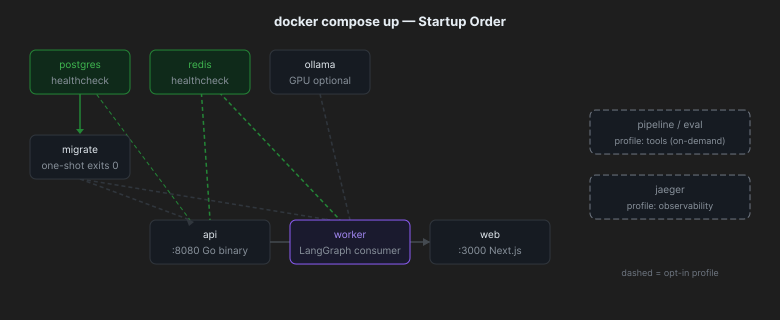
migrate is a one-shot service. It runs golang-migrate up, applies all pending migrations, then exits with code 0. condition: service_completed_successfully in the services that depend on it means they won't start until the schema is ready. Re-running docker compose up is idempotent — golang-migrate tracks applied versions in a schema_migrations table.
1 api:2 build:3 context: .. # repo root for schema access4 dockerfile: services/api/Dockerfile5 env_file: ../.env6 environment:7 # In-network names override the .env host defaults (which say 'localhost').8 DATABASE_URL: postgres://${POSTGRES_USER:-resolver}:${POSTGRES_PASSWORD:-resolver}@postgres:5432/${POSTGRES_DB:-resolver}?sslmode=disable9 REDIS_URL: redis://redis:6379/010 OTEL_EXPORTER_OTLP_ENDPOINT: ${OTEL_EXPORTER_OTLP_ENDPOINT:-http://jaeger:4318}11 depends_on:12 postgres:13 condition: service_healthy14 redis:15 condition: service_healthy16 migrate:17 condition: service_completed_successfully18 ports:19 - "8080:8080"2021 worker:22 build:23 context: ../workers/agent24 env_file: ../.env25 environment:26 DATABASE_URL: postgres://${POSTGRES_USER:-resolver}:${POSTGRES_PASSWORD:-resolver}@postgres:5432/${POSTGRES_DB:-resolver}?sslmode=disable27 REDIS_URL: redis://redis:6379/028 OLLAMA_HOST: http://ollama:1143429 OTEL_EXPORTER_OTLP_ENDPOINT: ${OTEL_EXPORTER_OTLP_ENDPOINT:-http://jaeger:4318}30 depends_on:31 postgres:32 condition: service_healthy33 redis:34 condition: service_healthy35 ollama:36 condition: service_started # Ollama has no healthcheck; started is enough37 migrate:38 condition: service_completed_successfully39 restart: on-failure4041 web:42 build:43 context: .. # repo root for schema/codegen access44 dockerfile: apps/web/Dockerfile45 depends_on:46 - api47 ports:48 - "3000:3000"
The API and worker both read from ../.env via env_file, then the environment block overrides the host-facing URLs with in-network service names (postgres, redis, ollama). This way the same .env file works for both local development (pointing at localhost) and containerized deployment (pointing at service names).
1 # profiles: ["tools"] — only starts when explicitly requested.2 # Run via: docker compose --profile tools run --rm pipeline python ingest_bitext.py3 pipeline:4 build:5 context: ../pipeline6 profiles: ["tools"]7 env_file: ../.env8 environment:9 DATABASE_URL: postgres://...10 OLLAMA_HOST: http://ollama:1143411 GOLDEN_PATH: /src/data/golden.jsonl12 volumes:13 - ../data:/src/data # writes golden.jsonl here14 depends_on:15 postgres:16 condition: service_healthy17 ollama:18 condition: service_started1920 eval:21 build:22 context: ..23 dockerfile: pipeline/eval/Dockerfile24 profiles: ["tools"]25 env_file: ../.env26 environment:27 DATABASE_URL: postgres://...28 OLLAMA_HOST: http://ollama:1143429 GOLDEN_PATH: /src/data/golden.jsonl30 EVAL_REPORT: /out/REPORT.md31 volumes:32 - ../data:/src/data33 - ../pipeline/eval/reports:/out # REPORT.md written here, visible on host34 depends_on:35 postgres:36 condition: service_healthy37 ollama:38 condition: service_started3940 # profiles: ["observability"] — opt-in distributed tracing UI.41 jaeger:42 image: jaegertracing/all-in-one:1.62.043 profiles: ["observability"]44 environment:45 COLLECTOR_OTLP_ENABLED: "true"46 ports:47 - "16686:16686" # Jaeger UI48 - "4318:4318" # OTLP/HTTP receiver4950volumes:51 pgdata:52 redisdata:53 ollamadata:
Step 4: Environment Configuration
.env.example is the config contract. Copy it to .env — every default works for local development with docker compose up, no keys required.
1# .env.example (abridged)23# Postgres4POSTGRES_USER=resolver5POSTGRES_PASSWORD=resolver6POSTGRES_DB=resolver7DATABASE_URL=postgres://resolver:resolver@postgres:5432/resolver?sslmode=disable8PG_POOL_MAX_CONNS=20910# Redis Streams11REDIS_URL=redis://redis:6379/012STREAM_MESSAGES=messages13STREAM_DRAFTS=drafts14STREAM_DEADLETTER=dead-letter15CONSUMER_GROUP=agent-workers1617# LLM — default: Ollama, $0, local18LLM_PROVIDER=ollama19OLLAMA_HOST=http://ollama:114342021# Model tiering: cheap for triage, stronger for drafting22TRIAGE_MODEL=qwen2.5:3b23DRAFT_MODEL=qwen2.5:7b24JUDGE_MODEL=qwen2.5:7b25EMBED_MODEL=nomic-embed-text26EMBED_DIM=7682728# Hosted provider switch (only used if LLM_PROVIDER=openai)29GEMINI_API_KEY=30OPENAI_API_KEY=3132# Safety caps33MAX_GRAPH_STEPS=1234MAX_REPAIR_RETRIES=135CONFIDENCE_THRESHOLD=0.636RETRIEVAL_TOP_K=53738# OTel: console=spans in logs, otlp=send to jaeger, none=disabled39OTEL_TRACES_EXPORTER=console40OTEL_EXPORTER_OTLP_ENDPOINT=http://jaeger:431841OTEL_SERVICE_NAME=resolver42LOG_LEVEL=info4344# API45API_PORT=808046API_HOST=0.0.0.047CORS_ALLOWED_ORIGINS=http://localhost:3000
The DATABASE_URL and REDIS_URL in .env point at in-network service names (postgres, redis). This works inside Docker networking. For local development outside containers, override them to localhost in a local .env.local or via shell exports.
Step 5: Model Tiering
Two models for different cost/quality points. The LLM interface is provider-agnostic — one env var switches the backend.
1TRIAGE_MODEL=qwen2.5:3b — fast, cheap; classifies intent + category only2DRAFT_MODEL=qwen2.5:7b — stronger; generates the cited customer reply3JUDGE_MODEL=qwen2.5:7b — same quality; scores candidate against reference4EMBED_MODEL=nomic-embed-text — 768-dim; matches vector(768) in kb_documents
To switch to a hosted provider:
1# .env overrides (no code change)2LLM_PROVIDER=openai3OPENAI_API_KEY=sk-...4OPENAI_BASE_URL=https://api.openai.com/v1 # or any compatible endpoint5TRIAGE_MODEL=gpt-4o-mini6DRAFT_MODEL=gpt-4o
The worker's chat_from_env(cfg) reads LLM_PROVIDER and returns either OllamaChat or OpenAIChat — both implement the ChatLLM Protocol. Same graph, same nodes, no change needed anywhere else.
Step 6: Observability — Traces Across the Bus
The most architecturally interesting part of the stack: a single OTel trace spans across a process boundary via the Redis event.
1API receives mutation2 → starts HTTP span (otelhttp)3 → extracts W3C traceparent4 → serialises trace_id into message.created event on Redis5 → span ends67Worker reads event8 → reads trace_id from event9 → creates child span continuing the same trace10 → runs LangGraph graph inside that span11 → all node calls, LLM calls, DB queries become child spans
This means a Jaeger search for a single trace_id shows the whole journey: the API's HTTP handler, the Redis publish, the worker's graph execution, and every LLM call — one waterfall view.
To enable:
1# Start the Jaeger UI alongside the default stack2docker compose --profile observability up jaeger34# Tell both services to ship spans to it5OTEL_TRACES_EXPORTER=otlp6OTEL_EXPORTER_OTLP_ENDPOINT=http://jaeger:4318
Then open http://localhost:16686 and search for service resolver.
Step 7: Quickstart
1# Clone and configure (defaults need no edits)2cd resolver3cp .env.example .env45# Build and boot the full stack6docker compose -f deploy/docker-compose.yml up -d78# First run: pull the three models (downloads ~5GB, one-time)9docker compose -f deploy/docker-compose.yml exec ollama ollama pull nomic-embed-text10docker compose -f deploy/docker-compose.yml exec ollama ollama pull qwen2.5:3b11docker compose -f deploy/docker-compose.yml exec ollama ollama pull qwen2.5:7b1213# Seed the knowledge base and write the golden set14docker compose -f deploy/docker-compose.yml --profile tools run --rm pipeline python ingest_bitext.py1516# Run the eval gate (exits 0 on pass, 1 on fail)17docker compose -f deploy/docker-compose.yml --profile tools run --rm eval1819# Open the console20open http://localhost:3000
What each make target does:
1make up # docker compose up -d (build + start)2make models # pull the three Ollama models3make ingest # docker compose run --rm pipeline python ingest_bitext.py4make eval # docker compose run --rm eval5make test # go test ./... (API) + python tests (worker + eval)6make gqlgen # go run gqlgen generate (regenerate Go types from schema)7make dev # run API + worker + web in foreground (outside Docker, for fast iteration)
Step 8: What docker compose up Actually Does
In order, with timing:
- postgres starts → healthcheck polls
pg_isreadyevery 5s → healthy after ~10s. - redis starts → healthcheck polls
redis-cli ping→ healthy after ~5s. - ollama starts immediately (
service_started, no healthcheck). - migrate starts once postgres is healthy → applies
000001and000002→ exits 0. - api starts once postgres healthy + redis healthy + migrate completed → Go binary up in ~1s.
- worker starts once postgres healthy + redis healthy + ollama started + migrate completed → Python process enters XREADGROUP blocking loop.
- web starts once api is started → Next.js standalone server up in ~2s.
Total cold-start time on a modern machine: ~30 seconds. After that, docker compose up on subsequent runs is ~5 seconds (containers already built, images cached, postgres/redis data persisted in named volumes).
What We Have
1deploy/docker-compose.yml — 9 services, 2 opt-in profiles, 3 named volumes2services/api/Dockerfile — multi-stage Go, distroless/nonroot runtime3workers/agent/Dockerfile — Python 3.12-slim, nonroot user4apps/web/Dockerfile — 3-stage Node, standalone Next.js output5pipeline/Dockerfile — Python 3.12-slim, HF cache mounted6pipeline/eval/Dockerfile — builds from repo root, reuses worker code on PYTHONPATH7db/migrations/ — 000001 schema + 000002 indexes, applied by golang-migrate8.env.example — full config contract, zero required keys for local run
Three design decisions that carry through everything:
One .env.example, zero required secrets. Every default points at an in-network service. Clone, copy, up. No paid API, no hosted service, no configuration ceremony.
Profiles keep the default stack clean. docker compose up boots only the always-on services. pipeline and eval run on demand via --profile tools. jaeger is --profile observability. The default stack is small and fast.
Traces cross the bus. The trace_id in the Redis event is what makes this observable. Without it, you'd need two separate Jaeger searches to understand what happened to one customer message. With it, one trace shows the entire path.







![Let's Build a Print-Ready Die-Cut Sticker SaaS from scratch in Golang & Next.js [Part 6]](/_next/image/?url=https%3A%2F%2Fcdn.sanity.io%2Fimages%2F3e1sexdu%2Fproduction%2Feeb1314f51d4c39e5d1e176c2c837de8f33725ca-1600x739.png%3Frect%3D61%2C0%2C1478%2C739%26w%3D800%26h%3D400%26q%3D85%26fit%3Dcrop%26auto%3Dformat&w=3840&q=75)